Gadget Rehab - how we manage your repair

The Best Repair Management Software

We know how important your tech is to you and how quickly you need to have it back. That’s why we offer many same-day repairs where possible. Whatever you need in terms of repair, we always keep you up to date using dedicated software called RepairDesk. In this blog, we explain how we manage your repair with our repair management software.

How we manage your repair

RepairDesk*is designed specifically for tech repair specialists to enable professionals like us to keep our customers up to date. The advanced capability means that your updates are also in real-time. At Gadget Rehab, we have been operating this repair management software for eight years. This is key to how we manage your repair.

As a customer, your first experience with this software is when we book your repair. The ticketing system means you receive a unique ticket number. This allows us to allocate the right time, technician and completion date for your repair. We can also take a photo of your device before we start any work as a record for us and you. Which is saved to the software.


Creating a Repair Checklist

The next step is to create your repair checklist, which we also complete using the RepairDesk repair software. This checklist allows us and you to see the progress and status of your repair. The status changes as we go through the repair process. We will even email you at key stages of the process, so you know where we are.
Once the repair has been completed, you will receive a notification by email of its completion. This will be updated on your ticket and reflected on the job status. We also provide you with the option to sign digitally creating a record for both you and for us. This allows us to build a full history of our customer experience and a reference point for future appointments and repairs. At Gadget Rehab, how we manage your repair is the first step to building a positive customer experience.


Real-time reporting with RepairDesk

Internally the customer management software enables our team to view all our current work schedules and the allocation to technicians. By having this transparency of service, it means any one of our team members can let you know the status of your order. All information is stored securely, and notes are added if additional parts or work is required. For us, it is an essential part of our business. We use the software to manage all of our workflows and ensure we offer the very best levels of customer service.

This repair shop software was initially designed for those working in the mobile phone repair industry and so is the perfect fit for our business. Now, the software has grown in popularity and is used by repair professionals across many industries. Trade professionals using this software in addition to tech repair specialists include plumbers and electricians.

Try the software today!

Repair Managment Software


Do you work in a field that you feel would benefit RepairDesk?

In our opinion, the best repair management software is RepairDesk. Click here to give it a try today*.

Need a repair?

If you need a repair to your mobile phone, tablet, laptop, PC, Mac, drone or DJ equipment contact us to book your appointment or use our quote form.


*Disclosure: This page contains affiliate links, whereby we may receive a commission on referring products and services. There is no extra cost to you but does help support our site and could entitle you to exclusive offers. We only recommend products and services we would use ourselves. All opinions expressed here are our own.

The best gaming accessories

Gaming is no longer the reserve of kids playing against themselves to pass the time. The genre has evolved significantly in recent years and now boasts a global online community. With this expansion in popularity and time spent playing, gaming accessories have also developed. The best gaming accessories will enhance your experience and provide you with the very best ergonomic tools of the trade.

1. Gaming Headset

A comfortable headset is a must to allow you to immerse yourself in the game and concentrate on your play. We would recommend one that supports stereo sound, so you are able to connect sound with the visual. A headset which has a high-quality microphone is also a must to communicate with other players. Options include both wireless and cable connected.

2. Gaming Chair

If you are spending a lot of time gaming, then a supportive chair is an essential item to enhance your experience. When choosing a gaming chair, look for one which has a high back to support both your back and neck and if it has additional supports even better. Your gaming chair should also have adjustable arm rests and seat height as a minimum but many also have the ability to tilt the seat position.

3. Graphics friendly Monitor

Playing the game is only half the enjoyment. Many games now pride themselves on sharp and technically advanced graphics which are best viewed on a high quality monitor. Many companies have developed monitors specifically for this purpose and come in a range of sizes.

4. Gaming Controller

Using a suitable gaming controller will allow greater dexterity and an overall more comfortable experience. There are many options including Bluetooth available and come with rechargeable batteries for hours of play. Choose one which is most responsive to the types of games that you play.

5. Gaming Desk

A suitable gaming desk, like a gaming chair, will enhance your playing experience and ensure that your posture remains healthy. Being hunched over a table that is the wrong height or size can cause neck and back pain. Gaming desks can be adjusted to suit the player and often come with storage or hooks for your other gaming equipment.

We have the knowledge and skill to make sure your gaming machines remain working correctly and efficiently. If your machine or system is in need of repair, contact us and will be make an appointment. We offer repairs to all makes and models and carry out all our work on site.

Happy Christmas from Gadget Rehab

Christmas Opening times at Gadget Rehab

Hopefully your preparations for Christmas are well underway and you are getting ready for some festive fun. Our team is – and after another challenging year we hope you can celebrate in style.

At Gadget Rehab, we have enjoyed several new achievements this year. We launched our training programme which was something we had wanted to do but was delayed due to the pandemic. The successful course also led to us expanding our team further by appointing one of the students.

Another highlight for us was the launch of our sister company GR Phones Ltd. This e-commerce platform sells the highest quality reconditioned phones and tablets. All tech undergoes our strict quality and testing procedures, so you know you are receiving the highest value handset or device. It’s also a great place to grab a last-minute gift for someone!

We know tech forms an important part of your holiday celebrations not only for entertainment but for keeping in touch with family and friends. New mobile phones, tablets, laptops and PCs are often bought for as presents for Christmas. With a wealth of winter and festive games, online films and shows to take advantage of, your tech gadgets need to be up to scratch.

Christmas Opening Times

To support you during the break we are open as usual in the run up to Christmas closing at 3pm on Christmas Eve, 24th December 2021. We will then be closed on the following days:

• Saturday 25th December 2021
• Sunday 26th December 2021
• Monday 27th December 2021
• Tuesday 28th December 2021

You can also email us or message us via Facebook during these times and we will respond when we are open again. It is important to us that we can support you as much as possible even when we are closed.

If you have a phone or tech gadget in need of repair before Christmas, then get in touch – our pre-Christmas break appointments are filling up! We can also give advice over the phone or using a direct message on social media.

So, all that is left for us to do now is wish you a very Happy Christmas and we look forward to seeing you when we re-open on Wednesday 29th December.

Is a cracked screen really that bad

Is a cracked screen really that bad?

So, you have cracked the screen on your phone, but is it really that bad? The simple answer is, it could be. In this blog, we look at the issues surrounding a cracked screen.

Visible Damage

When you have a cracked screen, even if the damage looks small, the phone is at risk of further harm as the cracks can move further across your screen. The break will not repair itself and so will only get worse over time. Most at risk is the touch screen function which will stop responding. This is a sensitive area of the phone and may also indicate the damage has gone beyond the casing. Another indicator of internal damage are groups of pixels which are “dead” and look like misty blurs on the display. They can also look like dark or white patches. This will need specialist repair and should not be used until rectified by a qualified engineer.

The screen contains elements which are also responsible for the colours that you can see on your device. Cracks affect this functionality and so the overall look of the device will be changed and make some elements difficult to read. This is not the ideal situation when browsing, selecting images or looking at social media.

Screen Cracks

The cracks also create gaps within the surface of your phone which leaves the device at risk of bacteria and dirt developing within them. Not only is this unhealthy for you but can cause damage inside the phone or within the small elements such as wires. Moisture from the air or on your hands can create all sorts of problems with the navigation functions of your phone or can cause your phone to cut out completely.

Cracks on part of the screen can spread and splinter quickly creating a “web” across the device. This will make the phone unusable as well as increasing the possibility that some shards may come loose and cause scratches or cuts on your hands. If your phone has cracked in this pattern, then it needs to be repaired as soon as possible as the device and you are at risk of serious harm.

Our Advice

Overall, a cracked screen impacts on the enjoyment of your phone, making it difficult to read and communicate which not only slows your interaction but makes the phone more frustrating to use. This can cause eye strain as you try to de-code what you are trying to look at.

At Gadget Rehab, we have repaired many cracked mobile screens and work on all makes and models. We would advise you to get a cracked screen fixed as soon as possible, the process is simple and cost effective. Contact us to book your repair here.

Common iPad Problems

Common iPad Problems

Apple does a great job of developing market leading products so much so that people refer to iPad as a general term for all tablets. But buying the market leader doesn’t guarantee an issue free experience. In this blog we outline the most common iPad problems.

Frozen Screen

A frozen screen can be very frustrating and hide a problem beneath, however, it could also be related to the device memory or an app or software issue. The simplest fix is to restart the machine by carrying out a force restart. This allows the machine to revert to a previous state and removes the problem conflicts.

If this doesn’t work, we recommend a system restore. We always recommend you regularly back up your device so that in the event of a system restore, you do not lose any data.

If the problem continues then it could be a hardware problem and that will need a technical repair.

Apps that Crash

Apps are continually being developed to ensure they meet the needs of the user and depending on your settings will be automatically updated when new versions are released. However, some updates can cause conflicts and can crash or freeze when opened. If a device restart doesn’t solve the problem, we would advise you to force stop the app and try and re-open it. If the app still crashes, then the only solution is to uninstall and re-install the app from the app store.


GET QUOTE

Charging Problems

If your iPad is failing to charge, then there is a process of checks you can do to find the source of the problem. Firstly, check if the charging icon is visible when the charger is plugged in to a socket. If the icon is visible, then there is an issue with the battery itself.

Try a different charger although always make sure it is an appropriate charger for the device. If a different charger doesn’t work, then it is best to bring the device to a qualified tech repair centre.

Slow Running Device

If your iPad is beginning to run slower than usual, check how many applications you have running. Swipe up from the bottom of the screen and close the apps that are open or running.

We would also recommend you check the storage in your settings. You will need at least 2GB of free space for your iPad to operate efficiently. To create more storage space, delete files you longer need, clear your cache and browsing history and uninstall apps that you no longer use or need.

If the problem persists then a system reset could also solve the problems, but like before any reset, you will need to make sure all data is backed up.

If you need help with any iPad problem, then contact the team at Gadget Rehab, we can offer advice over the phone or alternatively make an appointment for one of our engineers to review your device.


GET QUOTE

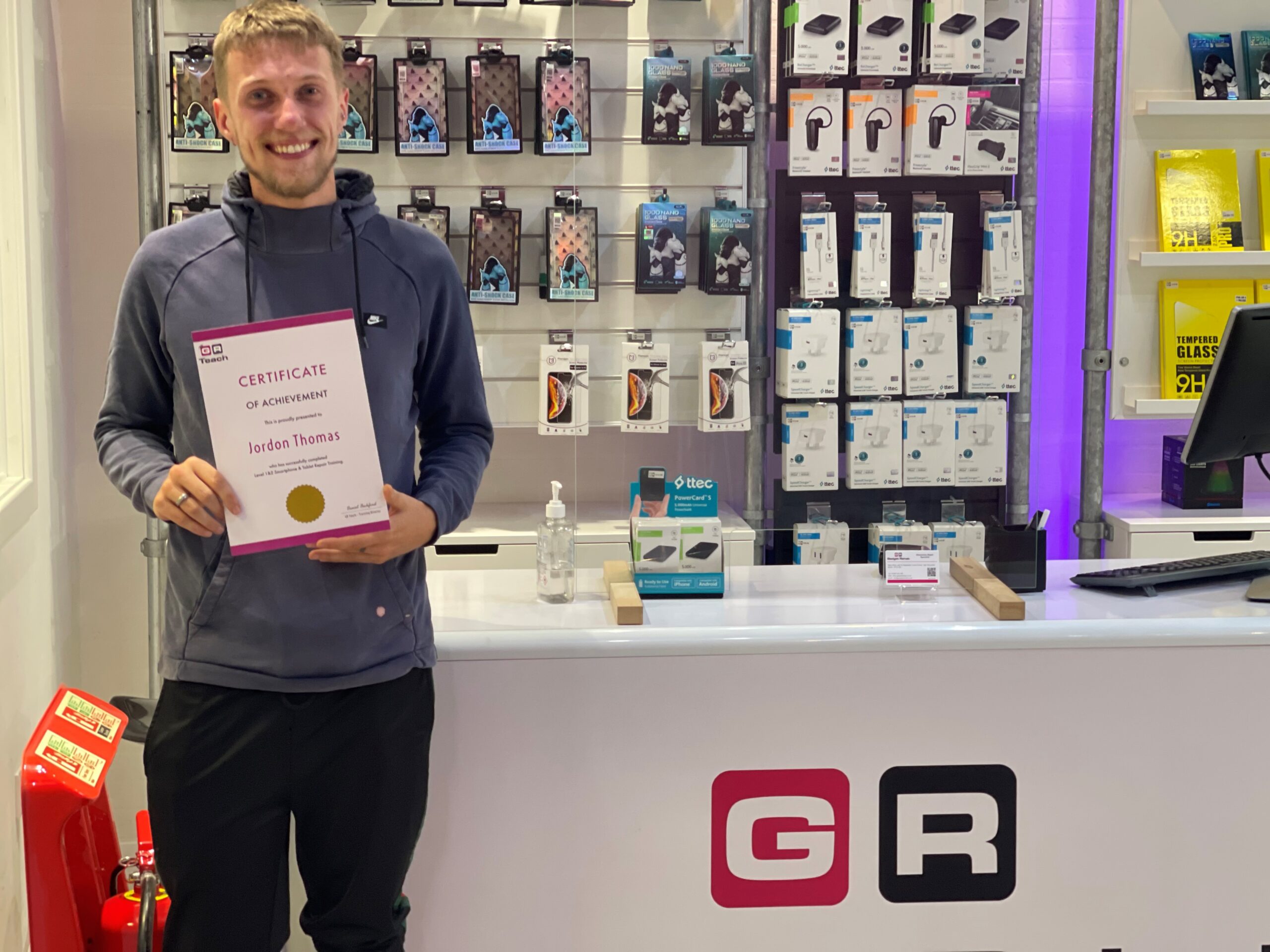
Jordan Thomas achieving his ambitions with Gadget Rehab

It was perfect timing when Gadget Rehab partnered with Red Kite Better Futures Youth Forum to support a local man achieve his ambitions of working in tech repair.

Jordan Thomas, a tenant of Red Kite Housing, was keen to pursue a career in tech repair but needed training and support to makes this a reality.
As a local employer, Gadget Rehab focuses on creating employment opportunities for those in the Wycombe area and is passionate about improving the skills of employees. Combining both of these elements, the business now offers training courses for those interested in smartphone and tablet repair as a career.

Daniel Beckford who owns and manages Gadget Rehab explains “I had been thinking about delivering training for a while so when I was approached by Red Kite to offer training placements to their youth forum, I knew it was the right time.”

The partnership between Red Kite and Gadget Rehab enabled Jordan to achieve Level 1 and 2 in Smartphone and Tablet Repair. Following the successful completion of the course, Gadget Rehab offered Jordan a role with their sister company GR Phones Ltd.

Nahida Latif, Red Kite’s Community Investment Specialist worked with Daniel Beckford, in placing Jordan with the business. Nahida said,

“I have loved working with Jordan and helping him to find a job that he is passionate about. He has done so well and with our help and the support of Gadget Rehab he is well on the way to a successful career. It’s been such a pleasure to help Jordan. It just goes to show how a small amount of support in the right area really can make a huge difference to someone and their future.”

The housing association manages the Red Kite Community Housing’s Starting Blocks Fund which provides financial support and networking to those looking to reach their potential. With assistance from Nahida, Jordan was able to access this funding to enable him to attend the course. Speaking about the opportunity, Jordan explains:

“The Red Kite Youth Forum is absolutely amazing. The opportunity it has given me has been life changing, it has really boosted my confidence and shown me there are people who care.”

"When I was approached about having a course funded to help me, I couldn’t believe it. Red Kite genuinely has openings, wants to listen and I think it’s just amazing. I’ve learnt so much, I now feel like I can take anything on.”

On Jordan’s progress, Daniel Beckford continued, “I’m over the moon with what Jordan has achieved and so happy to have him as part of our team. I’ve really enjoyed being part of the programme and it has been great to see Jordan gain confidence. This course has made a huge difference to him and it’s great to see him with a smile on his face.”

If you are interested in joining the Gadget Rehab training programme, please contact us.

Gadget Rehab Team Member Dan Tilley

For this "Get to know the Gadget Rehab Team" blog it is the turn of our Motherboard Technician/Head Technician Dan Tilley.

How long have you worked at Gadget Rehab?
5 Years as of November 2021

What is your specialist area of expertise?
Advanced repairs of electronics such as smartphones and laptops.

Describe your typical day at Gadget Rehab
Firstly, I prepare the devices and tickets that are assigned to me for that day so that I know should anymore be coming in I have the capacity to do so. Once prepared I then complete the tasks for the devices such as a screen replacement on a smartphone or a diagnostic on a laptop. For each ticket I will update any relevant notes and update the customers whether the device is ready or if we then have a quote for the repair. I may also assist with seeing to customers when they drop off or collect if our sales assistant is with another customer. During the day I will also order any parts that are required so that we are stocked and ready for any booked repairs that are upcoming. At the end of the day all my tickets would then be up to date. This means that either the task is complete, and the device(s) are ready to collect, or the customer has been updated if we require approval to continue with a repair or more information on the issues that they were having.

What do you enjoy most about working with electronics?
I would have to say that it’s because there is so many devices now and there is always something new coming out it brings on new challenges. It’s exciting how far these gadgets have come in the last 10 years and where we could be in the next 10.

What is the most complicated repair you have carried out?
There is quite a few! However, it must be a MacBook I repaired that was a newer model which has integrated storage and the customer needed the data. The board had suffered some liquid damage and we did not have any spare components and we could not source each of them, so we had to source another board in order to diagnose and repair it. Once I was able to identify the failed components, I could then use the donor board to get this working or at least powered so that we could back up the customer data for them. Fortunately, I did get this up and running so that the data was saved.

What is the strangest tech request you have ever had?

There is a few, but the most recent one from memory was a customer asking us to repair their broken iPhone SE 2020 camera by swapping with the one from their iPhone 6. Not only are the cameras completely different in specification but also the connectors would not fit if we tried.

Do family and friends always ask you questions about tech?
Yes, of course. At least once a week I am asked something technical, it could be something as simple as one of my parents asking how to send a document on their email. I also get asked now and again by friends quite technical questions whether it is computer or gaming related.

Are you Apple or Android?
Apple. For me personally it is because it’s what I am used to now. However, both Android and iOS have come so far and are very easy to use now.

What will be your next tech purchase?
I recently upgraded the graphics card in my personal computer and so the next purchase would probably be adding some RAM to upgrade it to 32GB of memory. The next gadget however may be an iPad or laptop as I would like something more portable but is bigger than my phone.

Which tech product would you put in room 101 and why?
The Samsung Fold or Flip phones as the repairability is near impossible and very costly. I like the idea of them, but they just aren’t good in my opinion.

If you would like to contact Dan or anyone else in the Gadget Rehab team click here.

Is your laptop running slowly

Is your Laptop running slowly?

If your laptop or computer is running slowly it doesn’t take long before you lose your patience in dealing with the issue. You assume there is nothing you can do and start looking for a new machine.

However, help is at hand, at Gadget Rehab we can review your machine and offer you practical solutions. If you would like to try to solve the issue yourself first, then follow the steps below which we have put into three categories:

System

The first thing is to shut down your machine and restart it. If you always have your machine in sleep mode, it may be missing vital updates which can slow your machine. This could be the time, switch it off, switch it on again, may just work.

Next, check which programs open on start up. If you have too many set to automatically load on start up, they will add to the time it takes for your machine to be fully operational. You can check this in task manager or the program settings.

Make sure you have anti-virus software installed and run it to check for any viruses that may have found their way onto your machine.

This is also a good time to check all your drivers are up to date. To check, search for the latest versions online and make sure they are installed.

Hardware

If the hard drive on your computer is close to being at maximum capacity this will significantly slow the speed of your machine. Your machine always needs capacity to store and manage temporary files to ensure the smooth running of your programs and the efficient running of your machine. Aim to always have 20% capacity on your hard drive.

To free up space quickly:

  • Empty the recycle bin
  • Delete temporary files and unnecessary files
  • Move large documents to external storage devices such as an external hard drive, USB or to the cloud

Some programs take up a large amount of space on your machine. Programs which are industry specific such as finance or design software can install add-ons which you are not using. Disable the features you do not use.

Software

If you have several tabs open at the same time or a lot of programs running, they are all competing for your machine’s resources. This can put too much pressure on the processing power and cause your computer to slow. To fix this:

  • Close the program completely when you have finished using it
  • Close tabs not in use
  • Bookmark tabs so you can refer to them at another time
  • Check installed programs are not running in the background or have encountered a problem

It is important to keep your software up to date, however, you should only install necessary software updates and disable those that update automatically.

If you are still experiencing issues with your laptop or computer running slowly then it is advisable to make an appointment with us at Gadget Rehab. One of our engineers will be able to look at your machine and find the root cause of the issue. Call us today on 01494534008.

If you are a keen PC Gamer it is important that your PC is cleaned at least once per year - some may even recommend much shorter intervals depending on the gamers usage and playing environment.

Thermal Paste Application on Graphics Card

PC's that are used for gaming generally are used more than the average PC and can build up substantial amounts of dust and dirt more quickly. This can lead to performance issues as the dust is often built up within the fan and heat sink which can cause the CPU and other vital components not to be kept as cool as they should be for optimal performance.

Moreover the thermal paste that is applied to keep the CPU cool can often become brittle in texture rather than smooth and soft. This may mean that the CPU is overheating which can result in system failures.

How often thermal paste should be reapplied is hard to confirm as it will depend on the quality of the thermal paste used initially by the manufacture or the last place that serviced the machine however if you are system cleaning every 6 - 12 months then this should be changed during this service.

Graphics Card Cleaning

If you feel your system needs cleaning please get in touch with us and we will arrange a booking with you. Tel: 01494534008

Turnaround times to suit you.